
Objective: The EP provides a summary of care record when transitioning or referring their patient to another setting of care, receives or retrieves a summary of care record upon the receipt of a transition or referral or upon the first patient encounter with a new patient, and incorporates summary of care information from other providers into their EHR using the functions of CEHRT.
EPs must attest to all three measures and must meet the threshold for at least two measures to meet the objective.
Measure 1: For more than 50 percent of transitions of care and referrals, the EP that transitions or refers their patient to another setting of care or provider of care: 1) Creates a summary of care record using CEHRT; and 2) Electronically exchanges the summary of care record | |
| Denominator | Number of transitions of care and referrals during the EHR reporting period for which the EP was the transferring or referring provider. |
| Numerator | The number of transitions of care and referrals in the denominator where a summary of care record was created using certified EHR technology and exchanged electronically. |
| Exclusion | A provider may exclude the measures if one of the following applies:
|
| Measure 2: For more than 40 percent of transitions or referrals received and patient encounters in which the provider has never before encountered the patient, the EP incorporates into the patient’s EHR an electronic summary of care document. | |
| Denominator | Number of patient encounters during the EHR reporting period for which an EP was the receiving party of a transition or referral or has never before encountered the patient and for which an electronic summary of care record is available. |
| Numerator | Number of patient encounters in the denominator where an electronic summary of care record received is incorporated by the provider into the certified EHR technology. |
| Exclusion | A provider may exclude the measures if one of the following applies:
|
Measure 3: For more than 80 percent of transitions or referrals received and patient encounters in which the provider has never before encountered the patient, the EP performs a clinical information reconciliation. The provider must implement clinical information reconciliation for the following three clinical information sets: 1) Medication. Review of the patient’s medication, including the name, dosage, frequency, and route of each medication. 2) Medication allergy. Review of the patient’s known medication allergies. 3) Current Problem list. Review of the patient’s current and active diagnoses. | |
| Denominator | Number of transitions of care or referrals during the EHR reporting period for which the EP was the recipient of the transition or referral or has never before encountered the patient. |
| Numerator | The number of transitions of care or referrals in the denominator where the following three clinical information reconciliations were performed: medication list, medication allergy list, and current problem list. |
| Exclusion | Any EP for whom the total of transitions or referrals received and patient encounters in which the provider has never before encountered the patient, is fewer than 100 during the EHR reporting period is excluded from this measure. |
Measure 1 Denominator
To be included in the denominator:
- Patient must have a referral documented during the reporting period
OR
- Patient’s clinical summary must be sent electronically during the reporting period
Create a Referral
- From the Referrals tab in the chart or the Orders/Referrals tab in the encounter, click Add
- Populate the following sections:
- Date Requested (chart level only)
- Requested By
- Requested By must be EP
- Refer To
- Refer To must be a secure contact
- Reason for Referral/Notes
- ICD Code or CPT/HCPCS
- Select the Summary of Care Record Provided checkbox
- Click Add
Send a Clinical Summary
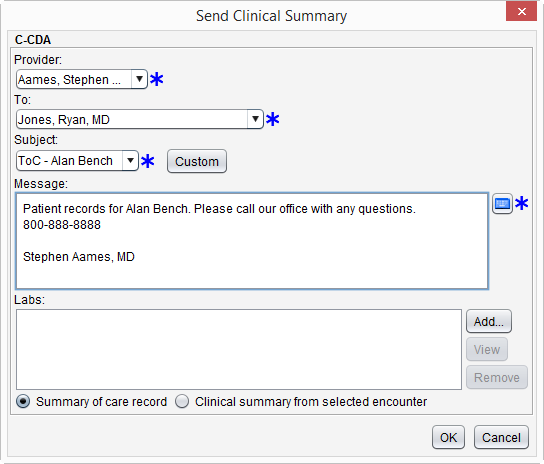
- From the patient chart go to Chart Tools > Send Clinical Summary
- Populate the required fields of Provider, To, Subject, and Message
- Provider selected must be EP
- Select Summary of care record or Clinical summary from selected encounter
- If Clinical summary from selected encounter is chosen, a patient encounter must be selected to continue sending the clinical summary. Click Add in the Patient Encounter section to add an encounter
- Optional: Click Add in the Labs section and select the lab result(s) to be sent
- Click OK to send
Measure 1 Numerator
To be included in the numerator:
- Patient referral must be sent electronically during the calendar year
OR
- Patient’s clinical summary must be sent electronically during the calendar year
Send a Referral Using PPDX
- From the Referrals tab in the chart or the Orders/Referrals tab in the encounter, select the referral to be sent
- Click Send
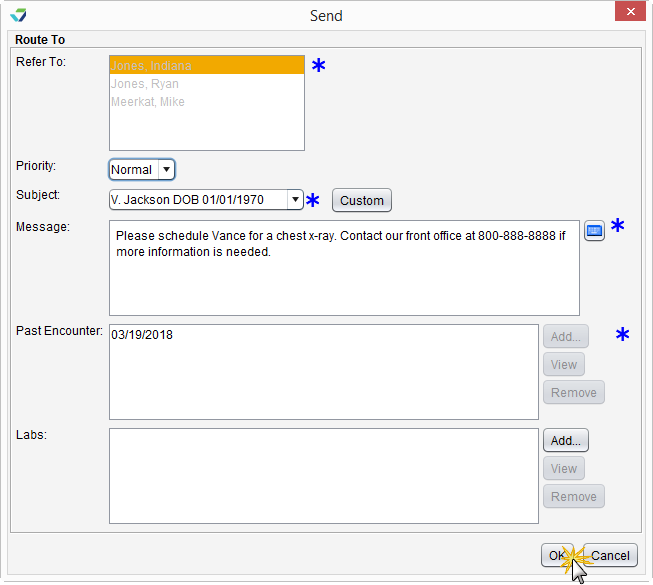
- Populate the Subject and Message fields
- Select a message favorite from the Subject selection list or click Custom and type a subject and message
- If sending from the patient chart, click Add in the Past Encounter section to select an encounter to send with the referral
- If sending from the encounter, the patient information from the open encounter will be included with the referral
- Optional: Click Add in the Labs section to attach one or more lab results
- Click OK to send
A clinical summary can be sent electronically by following the steps outlined in the denominator.
Measure 2 Denominator
To be included in the denominator:
- Patient must have a clinical reconciliation of a C-CDA performed by the EP during the reporting period
OR
- Patient must have a Continuity of Care Document (CCD) stored to their chart during the reporting period
Note
Patients with a CCD stored to their chart can only be counted toward the denominator and cannot be counted toward the numerator. Sevocity recommends performing a clinical reconciliation for all files in C-CDA format received for a patient.
Perform a Clinical Reconciliation using the C-CDA Reconciliation Tool
- Go to Chart > Chart Tools > C-CDA Reconciliation or Tools > C-CDA Reconciliation
- Click Import to choose a C-CDA file
- Select the file and click Open
- Verify patient selected matches the file chosen and select the I have verified the document belongs to the above patient checkbox
- If reconciling from the Tools menu, click Select to search for and select a patient, then select the verification checkbox
- Click Next
- Reconcile the file by selecting the checkbox(es) next to the problems, allergies, and medications to be incorporated into the patient’s chart
- At least one problem, allergy, or medication must be selected to complete the reconciliation
- Click Review
- Review the incorporated data for accuracy and click Sign to complete the reconciliation
Perform a Clinical Reconciliation from the Provider PDX Inbox
- Select a message with a C-CDA file attachment from the PPDX Inbox
- Click View or double-click the message to view its contents
- From the Attachments section, select the checkbox next to the C-CDA file to be reconciled
- Click Import
- Click Select to search for and select a patient and select the I have verified the document belongs to the above patient checkbox
- Click Next
- Click Reconcile
- Reconcile the file by selecting the checkbox(es) next to the problems, allergies, and medications to be incorporated into the patient’s chart
- At least one problem, allergy, or medication must be selected to complete the reconciliation
- Click Review
- Review the incorporated data for accuracy and click Reconcile/Sign to complete the reconciliation or click Start Reconciliation Encounter to document additional information in a Reconciliation encounter type
- If Start Reconciliation Encounter is selected, the encounter must be finalized by the EP
Tip
From the Attachments section of an open message, select the C-CDA file to be reconciled and click View to view the contents of the file prior to beginning a reconciliation.
Measure 2 Numerator
To be included in the numerator:
- Patient must have a clinical reconciliation of a C-CDA performed by the EP during the reporting period
The clinical reconciliation of a C-CDA can be performed from the C-CDA Reconciliation tool or the PPDX Inbox using the steps outlined in the denominator.
Measure 3 Denominator
To be included in the denominator:
- Patient must be identified as a transition of care patient in an eligible encounter during the reporting period
- Eligible encounters for this measure are: Multi-System, Exam, Urgent Care, Reconciliation, Initial OB, Visit, OB Follow Up Visit, and OB Postpartum Visit
- Encounter must be finalized by the EP
OR
- Patient must have a clinical reconciliation of a C-CDA performed by the EP during the reporting period
 To identify a patient as a transition of care patient, go to the Coding tab of the eligible encounter and select the Encounter Related to Transition of Care into Clinic checkbox.
Perform a Clinical Reconciliation using the C-CDA Reconciliation Tool
- Go to Chart > Chart Tools > C-CDA Reconciliation or Tools > C-CDA Reconciliation
- Click Import to choose a C-CDA file
- Select the file and click Open
- Verify patient selected matches the file chosen and select the I have verified the document belongs to the above patient checkbox
- If reconciling from the Tools menu, click Select to search for and select a patient, then select the verification checkbox
- Click Next
- Reconcile the file by selecting the checkbox(es) next to the problems, allergies, and medications to be incorporated into the patient’s chart
- At least one problem, allergy, or medication must be selected to complete the reconciliation
- Click Review
- Review the incorporated data for accuracy and click Sign to complete the reconciliation
Perform a Clinical Reconciliation from the Provider PDX Inbox
- Select a message with a C-CDA file attachment from the PPDX Inbox
- Click View or double-click the message to view its contents
- From the Attachments section, select the checkbox next to the C-CDA file to be reconciled
- Click Import
- Click Select to search for and select a patient and select the I have verified the document belongs to the above patient checkbox
- Click Next
- Click Reconcile
- Reconcile the file by selecting the checkbox(es) next to the problems, allergies, and medications to be incorporated into the patient’s chart
- At least one problem, allergy, or medication must be selected to complete the reconciliation
- Click Review
- Review the incorporated data for accuracy and click Reconcile/Sign to complete the reconciliation or click Start Reconciliation Encounter to document additional information in a Reconciliation encounter type
- If Start Reconciliation Encounter is selected, the encounter must be finalized by the EP
Tip
From the Attachments section of an open message, select the C-CDA file to be reconciled and click View to view the contents of the file prior to beginning a reconciliation.
Measure 3 Numerator
To be included in the numerator:
- Patient must have a clinical reconciliation performed in an eligible encounter in which the patient was identified as a transition of care during the reporting period
- Eligible encounters for this measure are: Multi-System, Exam, Urgent Care, Reconciliation, Initial OB, Visit, OB Follow Up Visit, and OB Postpartum Visit
- Encounter must be finalized by the EP
OR
- Patient must have a clinical reconciliation of a C-CDA performed by the EP during the reporting period
Perform a Clinical Reconciliation from an Encounter
- From the Allergies/Meds Hx tab, select the Allergies Reviewed checkbox
- From the Allergies/Meds Hx tab, select the Medications Reviewed checkbox or the Patient Takes No Medications checkbox or from the Medications tab, select the Medication reconciliation performed checkbox
- From the Assessment tab, select the No active problems checkbox or select the checkbox in the Assessed column for any active diagnosis or add a new diagnosis using the Add (Favorites) or Add (Master List) button
- Selecting any active diagnosis and then selecting the Inactivate or Resolve button will count toward reconciling current problems
- Selecting any active diagnosis and then selecting the Change button and updating and saving information in the Chronicity, Severity, Progress, Anatomical location site, or Note field will count toward reconciling current problems
- Selecting any active diagnosis and then selecting the Map SNO button and mapping to a SNOMED CT code will count toward reconciling current problems
- Selecting any active SNOMED code and then selecting the MAP ICD/SNO button and mapping to an ICD‑10 code will count toward reconciling current problems
The clinical reconciliation of a C-CDA can be performed from the C-CDA Reconciliation tool or the Provider PDX Inbox using the steps outlined in the denominator.
Additional Information
- For Measure 1, the electronic transmission of the clinical summary or referral must be successful in order to count toward the numerator
- Transmissions that are not successful will generate an “Undeliverable” message in the Provider PDX Inbox
Return to 2018 Medicaid Promoting Interoperability Objectives