
| Measure: Percentage of patients 65 years of age and older who were screened for future fall risk during the measurement period | ||
| Measure Type | High Priority Measure | Scoring |
| Process | Yes | A higher percentage indicates better quality |
| Denominator | Patients aged 65 years and older with a visit during the measurement period |
| Numerator | Patients who were screened for future fall risk at least once within the measurement period |
| Denominator Exceptions | None |
| Denominator Exclusions | Exclude patients:
|
Denominator
Patients who meet the following criteria will be included in the denominator:
Age is ≥ 65 years at the beginning of the Measurement Period
AND
- Must have at least one encounter during the Measurement Period finalized by the EC/EP
Encounter Codes Eligible for Denominator
CPT: 99201, 99202, 99203, 99204, 99205, 99212, 99213, 99214, 99215, 99395, 99396, 99397, 99385, 99386, 99387, 99341, 99342, 99343, 99344, 99345, 99347, 99348, 99349, 99350, 92002, 92004, 92012, 92014, 99401, 99402, 99403, 99404, 99315, 99316, 99304, 99305, 99306, 99307, 99308, 99309, 99310, 99324, 99325, 99326, 99327, 99328, 99334, 99335, 99336, 99337, 92540, 92541, 92542, 92548
HCPCS: G0438, G0439
Denominator Exclusions
A patient will be excluded from this measure if they were assessed to be non-ambulatory during the Measurement Period OR were in hospice care during the Measurement Period.
Non-Ambulatory Assessment
 To document a non-ambulatory assessment from the Fall Risk Screening flowsheet:
- Go to Encounter > Flowsheets/Labs > Standard Flowsheets
- Click Add New Flowsheet
- Select the Fall Risk Screening flowsheet and click Add
- Click Add Column
- Select a Value from the Patient exempt due to following reason list
- Click OK to save
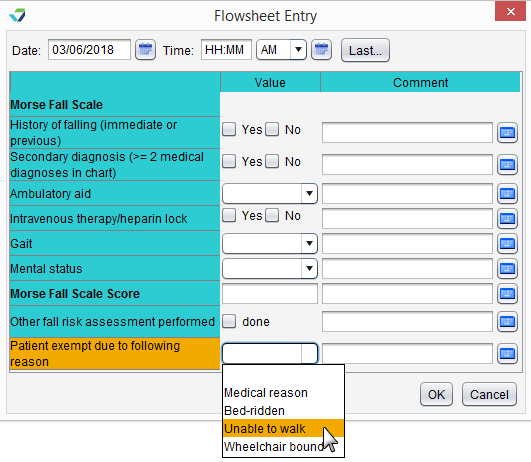
Selecting Bedrest/wheelchair for Gait assessment on the Morse Fall Scale in the Fall Risk Screening flowsheet will also exclude a patient from the measure.

Hospice Care Services
To document hospice care services as a procedure, go to Encounter > Orders/Procedure > Orders/Referrals and click Add to add one of the eligible codes listed below:
SNOMED CT: 385763009, 385765002
Order Status must be marked as Complete.
Note
SNOMED CT codes must be added as a Favorite in Preferences > Form Data > Orders to be accessible from the Orders/Referrals tab.
Numerator
A patient will be counted in the numerator if they received a fall risk screening with the Morse Fall Scale assessment or through another screening method during the Measurement Period.
Morse Fall Scale
To document a screening using the Morse Fall Scale:
- Go to Encounter > Flowsheets/Labs > Standard Flowsheets
- Click Add New Flowsheet
- Select the Fall Risk Screening flowsheet and click Add
- Click Add Column
- Select a Value for all questions in the screening
- Click OK to save

Other Screening Methods
To document the performance of a fall risk screening with a different screening tool:
- Go to Encounter > Flowsheets/Labs > Standard Flowsheets
- Click Add New Flowsheet
- Select the Fall Risk Screening flowsheet and click Add
- Click Add Column
- Select the Done checkbox for Other fall risk assessment performed
- Click OK to save
eCQI Reference
Return to 2019 eCQMs