
The Immunizations tab displays immunizations documented for a patient and consists of two subtabs: Child and Adult. Selecting Immunizations opens the appropriate subtab based on the patient’s age.
Configuration
The display order for documented immunizations can be set by the Clinic Administrator by going to Tools > Preferences > CLINIC > Clinic Settings: Display and selecting Ascending or Descending for Immunizations by Date
Immunizations
The Immunizations section displays all immunizations documented in the patient’s encounters. Immunization records can be exported from this section, and if available, immunization history and forecast information from an immunization registry can be viewed.
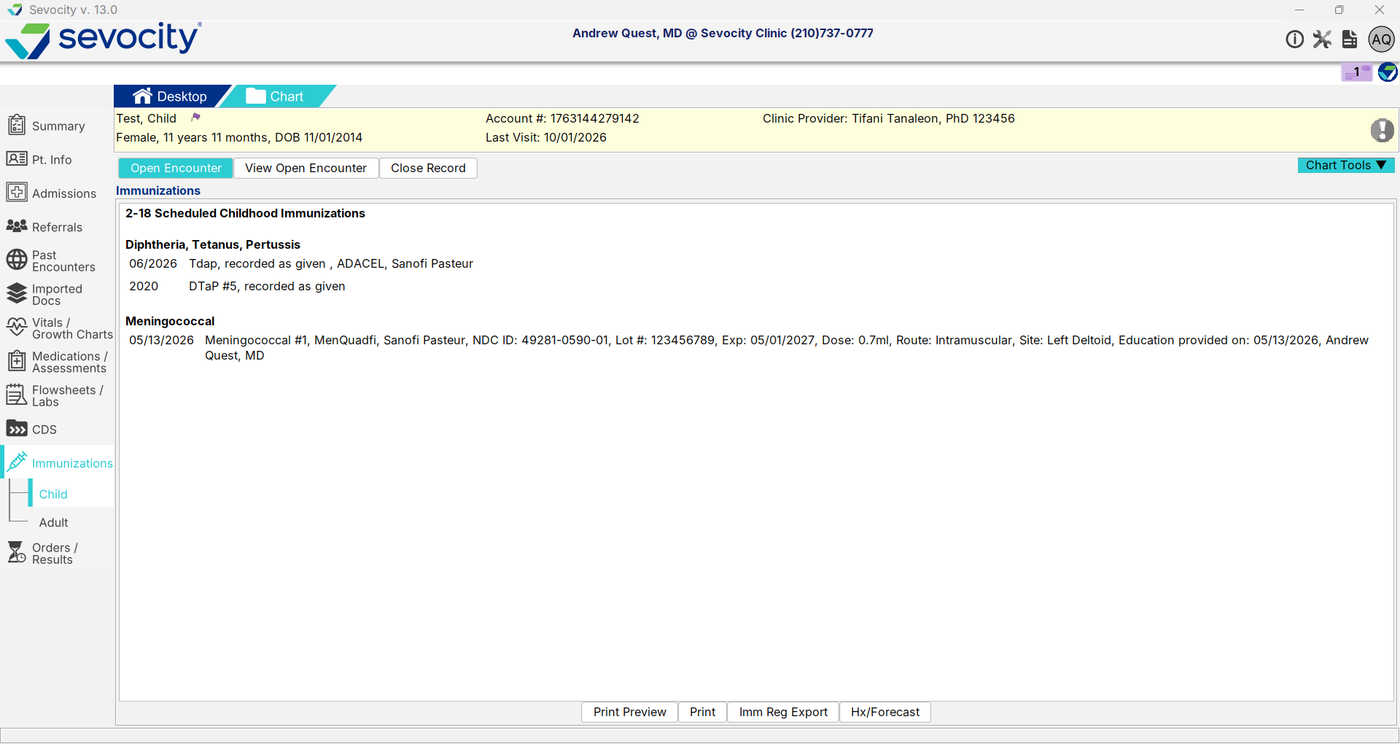
Export a Patient Immunization Record
- Go to Chart > Immunizations/Growth Charts or Chart > Immunizations
- Click Imm Reg Export
- Select one or more immunizations
- Click Export
- Select a location to save the file and type a File Name
- Click Save
The immunization data is exported as an HL7 output file.
Hx/Forecast Button
Clinics that have a bi-directional immunization interface with a registry that provides history and forecast information will be able to access a patient’s immunization histories and forecasts by clicking Hx/Forecast.