
The Carbon Copy tab is used to identify healthcare professionals or healthcare organizations that should receive a copy of the patient’s encounter note. Additional notes about the encounter as well as consultation notes can be documented in this tab.
Carbon copy recipients can be selected from a patient’s existing Professional Contacts, from the User or Clinic Contact List, or created from this tab. Referring providers added in the HPI tab of the encounter will automatically appear in the Carbon Copy list.
Encounter Types
Carbon Copy is available in the following encounter types: Exam, Multi-System, Procedure, Reconciliation, Telephone, and Urgent Care.
Add a Carbon Copy Recipient
- Go to Encounter > Carbon Copy
- Select a contact from the Patient Contacts, User Contacts, or Clinic Contacts list or click Custom to add a new contact
- The Patient, User, and Clinic Contacts lists default to All contacts but can be filtered by specialty
- Optional: Continue to add carbon copy recipients as needed
- Optional: Type comments or additional information in the Notes field
- Optional: Type comments or additional information in the Consultation Note field

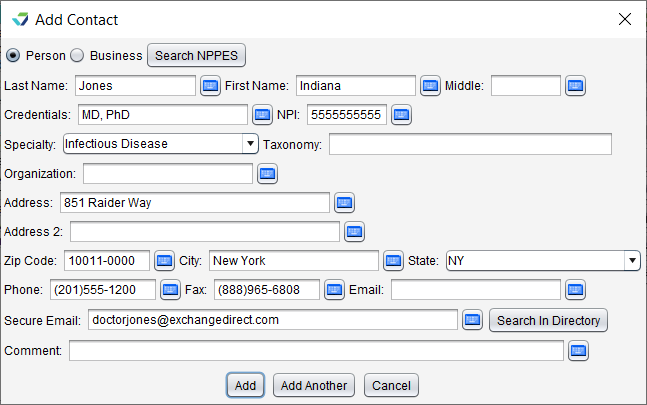
Create a Custom Carbon Copy Recipient
- Go to Encounter > Carbon Copy
- Click Custom
- Select Person or Business
The contact information can be populated using the following methods:
Click Search NPPES to search for and import a contact using the NPPES directory
Click Search in Directory to search for and import a contact using the Direct exchange email address directory
Manually enter the contact details for the person or business
- Optional: select Add to My Contact List checkbox to create a User Contact from this entry
- Click Save to add the contact
Optional: Continue to add carbon copy recipients as needed
Update a Carbon Copy Recipient
Select a recipient and click Change to update the contact information. Changes made to contact information are saved in the encounter only and do not affect User or Clinic contacts.
Delete a Carbon Copy Recipient
Select a recipient and click Delete then click Yes to confirm decision to delete