
| Measure: For at least one transition of care or referral, the MIPS EC that transitions or refers their patient to another setting of care or health care provider — (1) creates a summary of care record using CEHRT; and (2) electronically exchanges the summary of care record. | |
| Denominator | Number of transitions of care and referrals during the performance period for which the MIPS eligible clinician was the transferring or referring clinician. |
| Numerator | The number of transitions of care and referrals in the denominator where a summary of care record was created using CEHRT and exchanged electronically. |
| Exclusion | Any MIPS eligible clinician who transfers a patient to another setting or refers a patient fewer than 100 times during the performance period. |
What is a Transition of Care?
CMS defines a transition of care as the movement of a patient from one setting of care (hospital, ambulatory primary care practice, ambulatory, specialty care practice, long-term care, home health, rehabilitation facility) to another. At a minimum, this includes all transitions of care and referrals that are ordered by the MIPS eligible clinician.
Denominator
To be included in the denominator:
- Patient must have a referral documented during the performance period
OR
- Patient’s clinical summary must be sent electronically during the performance period
Create a Referral
- From the Referrals tab in the chart or the Orders/Referrals tab in the encounter, click Add
- Populate the following sections:
- Date Requested (chart level only)
- Requested By
- Requested By must be EC
- Refer To
- Refer To must be a secure contact
- Reason for Referral/Notes
- ICD Code or CPT/HCPCS
- Click Add
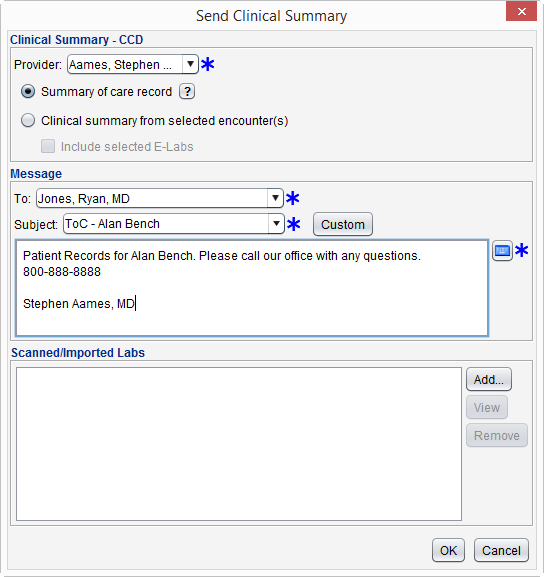
Send a Clinical Summary
- From the patient chart go to Chart Tools > Send Clinical Summary
- Populate the Provider field
- Provider selected must be EC
- Select Summary of care record or Clinical summary from selected encounter(s)
- Optional: If sending a Clinical summary from selected encounter(s), Include selected E-Labs can be selected
- Populate the To, Subject, and message body fields
- Optional: Click Add in the Scanned/Imported Labs section to attach one or more scanned or imported lab results
- Click OK to send
- If sending a Clinical summary from selected encounter(s), follow the encounter and e-Lab selection prompts to send the clinical summary
Numerator
To be included in the numerator:
- Patient referral must be sent electronically during the performance period
OR
- Patient’s clinical summary must be sent electronically during the performance period
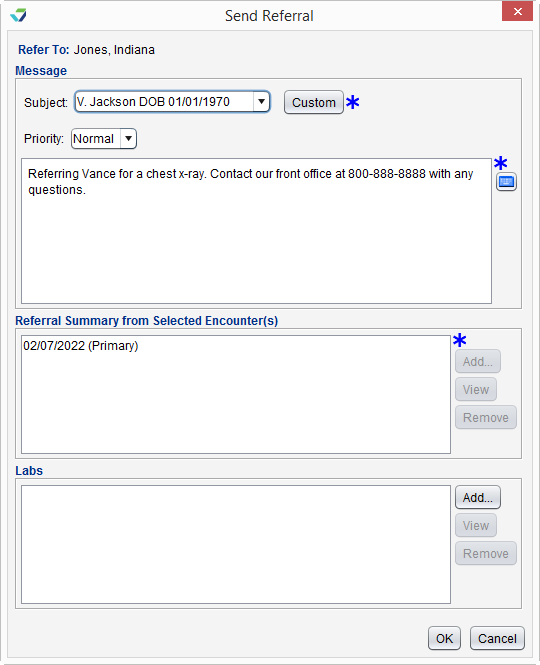
Send a Referral Using Direct Message
- From the Referrals tab in the chart or the Orders/Referrals tab in the encounter, select the referral to be sent
- Click Send
- Populate the Subject and message body fields
- If sending from the patient chart, click Add in the Referral Summary for Selected Encounter(s) section to select one or more encounters to send with the referral
- If sending from the encounter, the patient information from the open encounter will be included with the referral
Optional: If sending from the encounter, select Include clinical summary from additional encounter(s) checkbox to send one or more additional encounters with the referral
- Optional: Click Add in the Labs section to attach one or more lab results
- Click OK to send
A clinical summary can be sent electronically by following the steps outlined in the denominator.
Additional Information
- The electronic transmission of the clinical summary or referral must be successful in order to count toward the numerator
- Transmissions that are not successful will generate an “Undeliverable” message in the Direct Message Inbox