
| Measure: Percentage of patients 18-75 years of age with diabetes who had a nephropathy screening test or evidence of nephropathy during the measurement period | ||
| Measure Type | High Priority Measure | Scoring |
| Process | No | A higher percentage indicates better quality |
| Denominator | Patients 18-75 years of age with diabetes with a visit during the measurement period |
| Numerator | Patients with a screening for nephropathy or evidence of nephropathy during the measurement period |
| Denominator Exceptions | None |
| Denominator Exclusions |
|
Setup Note
A lab interface can be used to meet this eCQM but is not required. Customers interested in a lab interface should contact Sevocity Support to begin the process of a new interface setup. Interface setup requirements and fees vary per request.
Denominator
Patients who meet the following criteria will be included in the denominator:
Age is ≥ 18 years and < 75 years at the beginning of the Measurement Period
AND
Have an active diagnosis of Type 1 or Type 2 diabetes during the Measurement Period
AND
- Have at least one eligible encounter during the Measurement Period finalized by the EC
Encounter Codes Eligible for Denominator
CPT: 99201, 99202, 99203, 99204, 99205, 99212, 99213, 99214, 99215, 99395, 99396, 99397, 99385, 99386, 99387, 99341, 99342, 99343, 99344, 99345, 99347, 99348, 99349, 99350, 98966, 98967, 98968, 99441, 99442, 99443
HCPCS: G0438, G0439
Diagnosis
The patient must have an active diagnosis of Type 1 or Type 2 diabetes during Measurement Period. Patients with a diagnosis of secondary diabetes due to another condition are not counted.
Diagnoses are documented in the Assessment tab of an encounter. A comprehensive list of eligible diagnosis codes for diabetes can be located here.
Denominator Exclusions
A patient will be excluded from this measure if they meet any of the following conditions:
- Is in hospice care for any part of the Measurement Period
- Is receiving palliative care during the Measurement Period
- Age is ≥ 65 at the start of the Measurement Period and has spent more than 90 consecutive days during the Measurement Period living in long term care
- Age is ≥ 65 at the start of the Measurement Period and has evidence of frailty and advanced illness
Hospice Care Services
To document hospice care services as a procedure, go to Encounter > Orders/Procedure > Orders/Referrals and click Add to add one of the eligible codes listed below:
SNOMED CT: 385763009, 385765002
Order Status must be marked as Pending or Complete.
Note
SNOMED CT codes must be added as a Favorite in Preferences > Form Data > Orders to be accessible from the Orders/Referrals tab.
Palliative Care
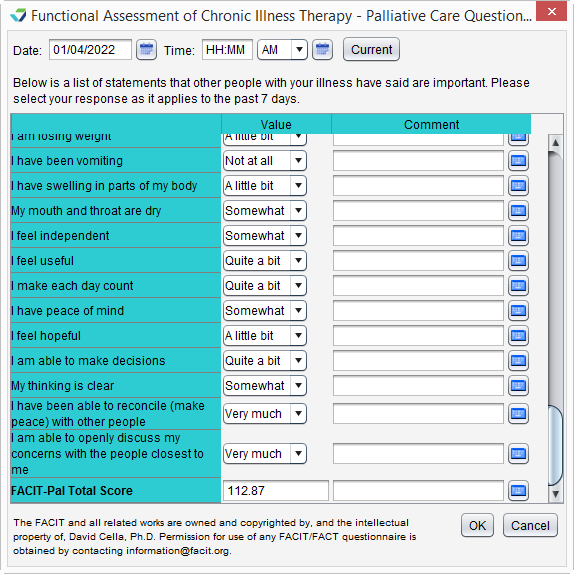
Palliative care services can be documented using the FACIT-Pal Questionnaire flowsheet or in the Orders/Procedure tab.
FACIT-Pal Questionnaire Flowsheet
Go to Encounter > Flowsheets/Labs > Standard Flowsheets
Click Add New Flowsheet
Select the FACIT-Pal Questionnaire flowsheet and click Add
Click Add Column
Populate the patient’s responses to the questions as appropriate
Click OK to save
Palliative Care Services Order
Go to Encounter > Orders/Procedure > Orders/Referrals and click Add to add one of the eligible codes listed below:
HCPCS: G9054, M1017
Order Status must be marked as Complete.
Long Term Care
To document a stay in long term care:
- Go to Chart > Admissions and click Add
- Select a Place of Service
- Optional: select a Facility
- Populate the Admit Date
- Optional: populate the Discharge Date
- Click OK
Note
If the admissions event does not have a Discharge Date when the eCQM report is generated, the length of stay will be calculated with a discharge date of the Reporting Period end date or the Measurement Period end date, whichever occurs first.
Frailty and Advanced Illness
Frailty
A patient has evidence of frailty if they meet any of the following criteria:
- Has an active diagnosis of Frailty during the Measurement Period
- Has an active diagnosis of Frailty Symptom during the Measurement Period
- Is using a frailty device during the Measurement Period
- Has a frailty encounter during the Measurement Period
Frailty Diagnosis
“Frailty” refers to a range of conditions that includes falls and problems affecting mobility.
Diagnoses are documented in the Assessment tab of an encounter. A comprehensive list of eligible diagnosis codes for frailty can be located here.
Frailty Symptom Diagnosis
Diagnoses are documented in the Assessment tab of an encounter. The eligible diagnosis codes for frailty symptoms are:
ICD-10: R26.0, R26.1, R26.2, R26.89, R26.9, R41.81, R53.1, R53.81, R53.83, R54, R62.7, R63.4, R63.6, R64
Frailty Device Use
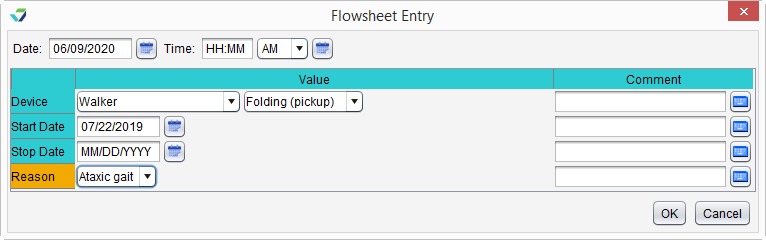
To document the patient’s use of a frailty device:
- Go to Encounter > Flowsheets/Labs > Standard Flowsheets
- Click Add New Flowsheet
- Select the Frailty Device flowsheet and click Add
- Click Add Column
- Select a Device and the type (Value) of device
- Populate a usage Start Date for the device
- Optional: populate a usage Stop Date for the device
- The Stop Date cannot occur prior to the start of the Measurement Period
- Optional: populate a Reason for use of the device
- Click OK to save
Frailty Encounter Codes Eligible for Denominator Exclusion
CPT: 99504, 99509
HCPCS: G0162, G0299, G0300, G0493, G0494, S0271, S0311, S9123, S9124, T1000, T1001, T1002, T1003, T1004, T1005, T1019, T1020, T1021, T1022, T1030, T1031
Advanced Illness
A patient has evidence of advanced illness if they meet any of the following criteria:
- Had an inpatient encounter with an active diagnosis of Advanced Illness during the Measurement Period or in the year prior
- Had 2 or more outpatient encounters with an active diagnosis of Advanced Illness during the Measurement Period or in the year prior
- Encounters must have different dates of service
- Diagnosis must be active during all eligible encounters
- Was prescribed medication for dementia during the Measurement Period or in the year prior
Advanced Illness Diagnosis
“Advanced illness” refers to a wide range of conditions and includes diseases such as Alzheimer’s disease, cancer, and heart failure.
Diagnoses are documented in the Assessment tab of an encounter. A comprehensive list of eligible diagnosis codes for advanced illness can be located here.
Inpatient Encounter Codes Eligible for Denominator Exclusion
CPT: 99221, 99222, 99223, 99231, 99232, 99233, 99238, 99239, 99251, 99252, 99253, 99254, 99255, 99291
Outpatient Encounter Codes Eligible for Denominator Exclusion
CPT: 99201, 99202, 99203, 99204, 99205, 99211, 99212, 99213, 99214, 99215, 99241, 99242, 99243, 99244, 99245, 99341, 99342, 99343, 99344, 99345, 99347, 99348, 99349, 99350, 99381, 99382, 99383, 99384, 99385, 99386, 99387, 99391, 99392, 99393, 99394, 99395, 99396, 99397, 99401, 99402, 99403, 99404, 99411, 99412, 99429, 99455, 99456, 99483, 99217, 99218, 99219, 99220, 99281, 99282, 99283, 99284, 99285, 99304, 99305, 99306, 99307, 99308, 99309, 99310, 99315, 99316, 99318, 99324, 99325, 99326, 99327, 99328, 99334, 99335, 99336, 99337
HCPCS: G0402, G0438, G0439, G0463, T1015
Medication
To prescribe a medication, go to Encounter > Medications > Manage/Prescribe Meds > New Prescription. A comprehensive list of eligible dementia medications can be located here.
Numerator
A patient will be counted in the numerator if they received a screening for nephropathy during the Measurement Period or have evidence of nephropathy during the Measurement Period. Evidence of nephropathy qualifies as one or more of the following:
- Active diagnosis of Hypertensive Chronic Kidney Disease, Kidney Failure, Glomerulonephritis and Nephrotic Syndrome, Diabetic Nephropathy, or Proteinuria
- Active prescription for an ACE inhibitor or angiotensin-receptor blocker (ARB)
- Procedure for kidney transplant, dialysis services, or end-stage renal disease (ESRD) monthly outpatient services performed
- Dialysis education or Other services related to dialysis performed
Nephropathy Screening Performed
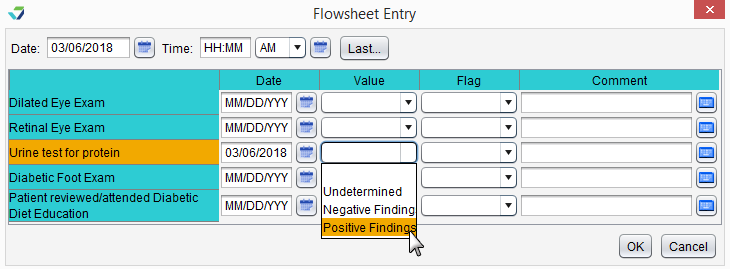
Document a Nephropathy Screening in the Diabetes Care Flowsheet
- Go to Encounter > Flowsheets/Labs > Standard Flowsheets
- Click Add New Flowsheet
- Select the Diabetes Care flowsheet and click Add
- Click Add Column
- Populate a Date and a Value for Urine test for protein
- Click OK to save
Nephropathy Screening e-Lab Result
- From the Clinic Inbox, select the lab result to be stored and click View
- Click Select to search for and select a patient
- Verify patient displayed matches the lab result and select the I have verified the following lab results belong to the above patient checkbox
- Click Sign/Route
- Select the Sign checkbox and click OK
Stored e-Lab results can be viewed in the Flowsheets/Labs > Scanned/E-Labs tab of the patient chart.
Evidence of Nephropathy
Diagnosis
Diagnoses are documented in the Assessment tab of an encounter. A comprehensive list of eligible diagnosis codes for hypertensive chronic kidney disease, kidney failure, glomerulonephritis and nephrotic syndrome, diabetic nephropathy, and proteinuria can be located here.
Medication
To prescribe a medication, go to Encounter > Medications > Manage/Prescribe Meds > New Prescription. A comprehensive list of eligible ACE inhibitor and ARB medications can be located here.
Procedure Codes
To document a procedure, go to Encounter > Orders/Procedure > Orders/Referrals and click Add to add one of the eligible codes listed below. Order Status must be marked as Complete.
Kidney Transplant
CPT: 50360, 50365, 50380
HCPCS: S2065
Dialysis Services
CPT: 90935, 90937, 90940, 90945, 90947, 90957, 90958, 90959
HCPCS: G0257
ESRD Monthly Outpatient Services
CPT: 90951, 90952, 90953, 90954, 90955, 90956, 90957, 90958, 90959, 90960, 90961, 90962, 90963, 90964, 90965, 90966, 90967, 90968, 90969, 90970, 90989, 90993, 90997, 90999, 99512
Dialysis Education and Other Services Related to Dialysis
To document the performance of these services, go to Encounter > Orders/Procedure > Orders/Referrals and click Add to add one of the eligible codes listed below. Order Status must be marked as Complete.
Dialysis Education
SNOMED CT: 28812006, 385972005, 59596005, 66402002
Other Services Related to Dialysis
SNOMED CT: 233591003, 251000124108, 311000124103, 3257008, 385970002, 385971003, 385973000, 406168002, 717738008, 718019005, 718308002, 718330001, 718331002, 73257006
Note
SNOMED CT codes must be added as a Favorite in Preferences > Form Data > Orders to be accessible from the Orders/Referrals tab
eCQI Reference
Return to 2022 eCQMs