
Measure: Percentage of patients aged 18 years and older with a BMI documented during the current encounter or during the previous twelve months AND with a BMI outside of normal parameters, a follow-up plan is documented during the encounter or during the previous twelve months of the current encounter. Normal Parameters: Age 18 years and older BMI => 18.5 and < 25 kg/m2 | ||
| Measure Type | High Priority Measure | Scoring |
| Process | No | A higher percentage indicates better quality |
| Denominator | All patients 18 and older on the date of the encounter with at least one eligible encounter during the measurement period |
| Numerator | Patients with a documented BMI during the encounter or during the previous twelve months, AND when the BMI is outside of normal parameters, a follow-up plan is documented during the encounter or during the previous twelve months of the current encounter |
| Denominator Exceptions |
|
| Denominator Exclusions |
|
Denominator
Patients who meet the following criteria will be included in the denominator:
Age is ≥ 18 years at the beginning of the Measurement Period
AND
- Have at least one eligible encounter during the Measurement Period finalized by the EC/EP
Encounter Codes Eligible for Denominator
CPT: 90791, 90792, 90832, 90834, 90837, 96150, 96151, 96152, 97161, 97162, 97163, 97165, 97166, 97167, 97802, 97803, 99201, 99202, 99203, 99204, 99205, 99212, 99213, 99214, 99215, 99236, 99304, 99305, 99306, 99307, 99308, 99309, 99310, 99315, 99316, 99318, 99324, 99325, 99326, 99327, 99328, 99334, 99335, 99336, 99337, 99339, 99340, 99385, 99386, 99387, 99395, 99396, 99397, 99401, 99402
HCPCS: G0101, G0108, G0270, G0271, G0402, G0438, G0439, G0447, G0473
Denominator Exceptions
A patient will be counted as an exception if there is a medical reason or urgent medical situation for not documenting their BMI or for not providing a BMI follow-up plan if BMI was out of the normal range. The reason for exception must be documented on the day of the eligible encounter or in the 12 months prior.
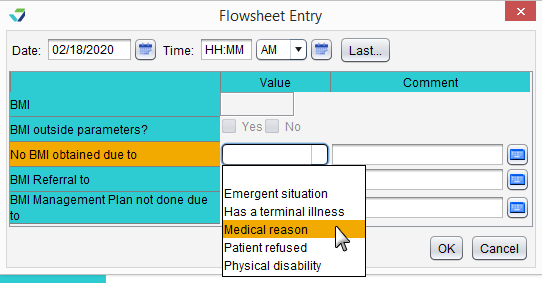
Document Reason BMI Was Not Obtained
- Go to Encounter > Flowsheets/Labs > Standard Flowsheets
- From the BMI – Adult flowsheet, click Add Column
- Select Emergent situation, Has a terminal illness, Medical reason, or Physical disability from the No BMI obtained due to list
- Click OK to save
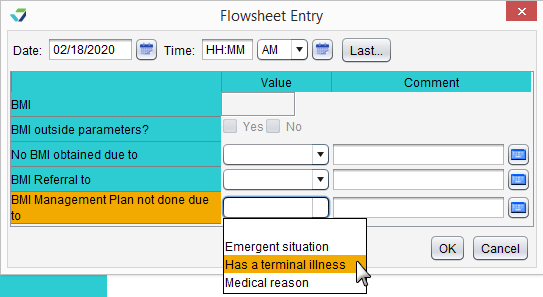
Document Reason BMI Management Plan Was Not Provided
- Go to Encounter > Flowsheets/Labs > Standard Flowsheets
- From the BMI – Adult flowsheet, click Add Column
- Select a Value from the BMI Management Plan not done due to list
- Click OK to save
Denominator Exclusions
A patient will be excluded from this measure if they meet any of the following conditions:
- Has an active diagnosis of pregnancy during the Measurement Period
- Has an order for hospice care on or before the eligible encounter date
- Is receiving palliative care during the Measurement Period
- Refuses to have their height or weight measured
Pregnancy Diagnosis
Diagnoses are documented in the Assessment tab of an encounter. A comprehensive list of eligible pregnancy diagnosis codes can be located here.
Hospice Care Services
To document hospice care services as a procedure, go to Encounter > Orders/Procedure > Orders/Referrals and click Add to add the following code: SNOMED CT: 385763009
Order Status must be marked as Pending or Complete.
Note
SNOMED CT codes must be added as a Favorite in Preferences > Form Data > Orders to be accessible from the Orders/Referrals tab
Palliative Care Encounter
A patient will be counted as an exclusion if the following diagnosis was Added or Assessed on or before the eligible encounter date:
ICD-10: Z51.5
The encounter must be finalized by the EC/EP and must be one of the following encounter types: Multi-System, Exam, Procedure, Initial OB Visit, OB Follow Up Visit, Postpartum Visit, or Urgent Care.
Patient Refused Height or Weight Measurement
- Go to Encounter > Flowsheets/Labs > Standard Flowsheets
- From the BMI – Adult flowsheet, click Add Column
- Select Patient Refused from the No BMI obtained due to list
- Click OK to save
Numerator
A patient will be counted in the numerator if their BMI was documented during the eligible encounter or in the 12 months prior. If the patient’s BMI is outside of the normal range (as defined by this measure), a BMI Management plan must be provided for the patient to be counted in the numerator.
Note
If more than one BMI is documented during the Measurement Period, the most recent BMI will be used to determine if the measure performance has been met
Document BMI
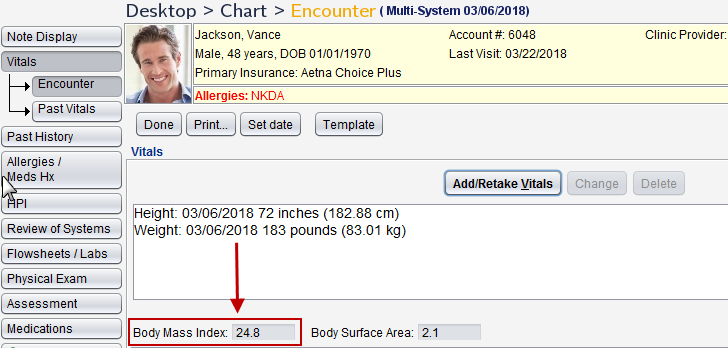
BMI is calculated based on the patient height and weight as entered in the Vitals tab of an encounter.
To document height and weight, go to Encounter > Vitals and click Add/Retake Vitals
Documenting BMI Follow-Up Plan
The BMI management plan can be documented in the BMI – Adult flowsheet, as a diagnosis, as a procedure, or through the prescription of a medication.
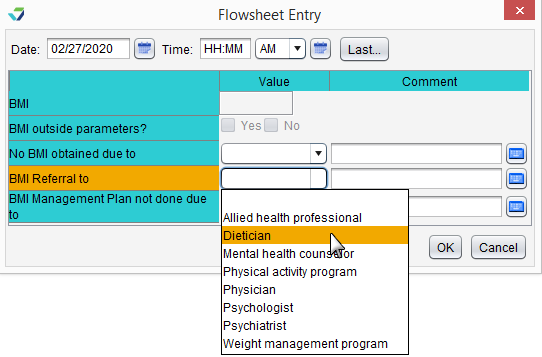
Document Referral Created for BMI Management in the BMI – Adult Flowsheet
- Go to Encounter > Flowsheets/Labs > Standard Flowsheets
- From the BMI – Adult flowsheet, click Add Column
- Select a Value from the BMI Referral to list
- Click OK to save
Note
This action does not create a referral in Sevocity. Referrals are created from the Referrals tab in the chart or from the Orders/Referrals tab in an encounter
Diagnosis
Diagnoses are documented in the Assessment tab of an encounter. A comprehensive list of eligible diagnosis codes for BMI management can be located here.
BMI Management Procedure
To document a procedure, go to Encounter > Orders/Procedure > Orders/Referrals and click Add to add an eligible code. Order Status must be marked as Complete. A comprehensive list of eligible procedure codes for BMI management can be located here.
Medication
To prescribe a medication, go to Encounter > Medications > Manage/Prescribe Meds > New Prescription. A comprehensive list of eligible BMI management medications can be located here.
eCQI Reference
Return to 2020 eCQMs