
| Measure: Percentage of patients aged 15-65 at the start of the measurement period who were between 15-65 years old when tested for HIV | ||
| Measure Type | High Priority Measure | Scoring |
| Process | No | A higher percentage indicates better quality |
| Denominator | Patients 15 to 65 years of age at the start of the measurement period AND who had at least one outpatient visit during the measurement period |
| Numerator | Patients with documentation of an HIV test performed on or after their 15th birthday and before their 66th birthday |
| Denominator Exceptions | None |
| Denominator Exclusions | Patients diagnosed with HIV prior to the start of the measurement period |
Setup Note
A lab interface can be used to meet this eCQM. Customers interested in a lab interface should contact Sevocity Support to begin the process of a new interface setup. Interface setup requirements and fees vary per request.
Denominator
Patients who meet the following criteria will be included in the denominator:
Age is ≥ 15 years and < 65 years at the beginning of the Measurement Period
AND
- Have at least one eligible encounter during the Measurement Period finalized by the EC/EP
Encounter Codes Eligible for Denominator
CPT: 99201, 99202, 99203, 99204, 99205, 99212, 99213, 99214, 99215, 99381, 99382, 99383, 99384, 99385, 99386, 99387, 99391, 99392, 99393, 99394, 99395, 99396, 99397
Denominator Exclusions
A patient will be excluded from the measure if they have an active diagnosis of HIV. The diagnosis Onset Date must be prior to the start of the Measurement Period.
Diagnoses are documented in the Assessment tab of an encounter. A comprehensive list of eligible diagnosis codes for HIV can be located here.
Numerator
A patient will be counted in the numerator if they were tested for HIV on or after their 15th birthday and before their 66th birthday.
- HIV test results must be stored as an e-Lab to the patient chart if ordered or performed by the EC/EP
- If the test results were received from another provider, the test can be documented in an encounter
HIV Test e-Lab Results
To document that an HIV test was performed, an e-Lab result for the test must be stored to the patient chart.
Store e-Lab Result
- From the Clinic Inbox, select the lab result to be stored and click View
- Click Select to search for and select a patient
- Verify patient displayed matches the lab result and select the I have verified the following lab results belong to the above patient checkbox
- Click Sign/Route
- Select the Sign checkbox and click OK
Stored e-Lab results can be viewed in the Flowsheets/Labs > Scanned/E-Labs tab of the patient chart.

Document HIV Test Results Received from Another Provider
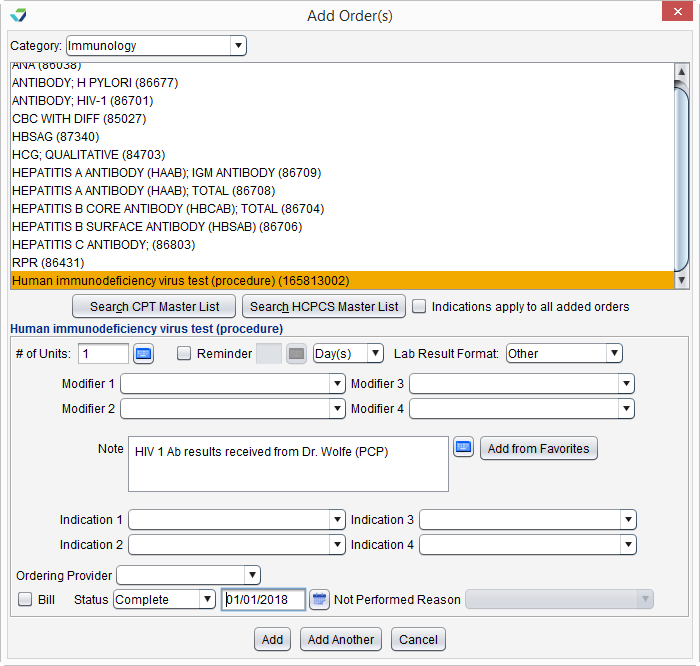
To document HIV test results received from another provider, go to Encounter > Orders/Procedure > Orders/Referrals and click Add to add the following code: SNOMED CT: 165813002
- Ordering Provider must be blank
- Order Status must be marked as Complete
- Order status date must populated
- Date must be on or after the patient’s 15th birthday and before the patient’s 66th birthday
Note
SNOMED CT codes must be added as a Favorite in Preferences > Form Data > Orders to be accessible from the Orders/Referrals tab
Sevocity Best Practice
Test results received from another provider should be stored to the patient encounter in which they were documented or to the patient chart
eCQI Reference
Return to 2021 eCQMs