
| Measure: During the performance period, at least one unique patient (or patient-authorized representatives) seen by the MIPS EC actively engages with the EHR made accessible by the MIPS eligible clinician by either—(1) viewing, downloading or transmitting to a third party their health information; or (2) accessing their health information through the use of an Application Programming Interface (API) that can be used by applications chosen by the patient and configured to the API in the MIPS eligible clinician’s CEHRT; or (3) a combination of (1) and (2). | |
| Denominator | The number of unique patients seen by the MIPS eligible clinician during the performance period. |
| Numerator | The number of unique patients (or their authorized representatives) in the denominator who have viewed online, downloaded, or transmitted to a third party the patient’s health information during the performance period and the number of unique patients (or their authorized representatives) in the denominator who have accessed their health information through the use of an API during the performance period. |
Denominator
To be included in the denominator:
- Patient must be seen by the EC during the performance period
Numerator
To be included in the numerator:
- The patient or patient-authorized representative must view or download the patient’s health information during the performance period
OR
- The patient or patient-authorized representative must transmit the patient’s health information to a third party during the performance period
OR
- Third party chosen by the patient must access the patient’s health information using Sevocity’s API for the patient portal during the performance period
The clinic must provide the patient or patient-authorized representative with a login and temporary password for the patient portal and instructions for a third-party application to access the patient’s health information using the patient portal API.
The clinic may also provide training to the patient or patient-authorized representative to assist in their use of the patient portal.
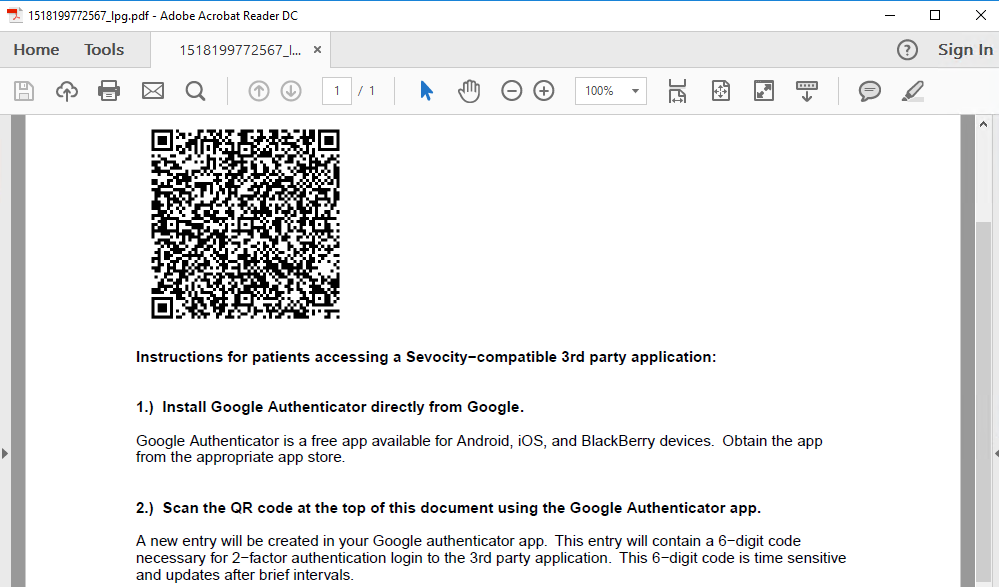
Provide Portal API Access Information
- Go to Tools > Patient Portal > Print Patient QR Code
- Enter patient search criteria and click Search
- Select patient and click OK
- Instructions will be generated as a PDF
- Provide this document to the portal account holder
Warning
The QR code on the instruction sheet is unique per patient and cannot be duplicated or shared among different patient portal accounts
Tip
To view patient action taken in the portal or third-party access activity of a patient’s data, run the Patient Portal Action Log Report
Additional Information
- Patients seen more than once during the performance period will only count once toward the measure.
- For ECs reporting as a group, a patient seen by more than one EC in the group will only count once toward the measure.