
Tools > Preferences > CLINIC > Clinic Settings > General
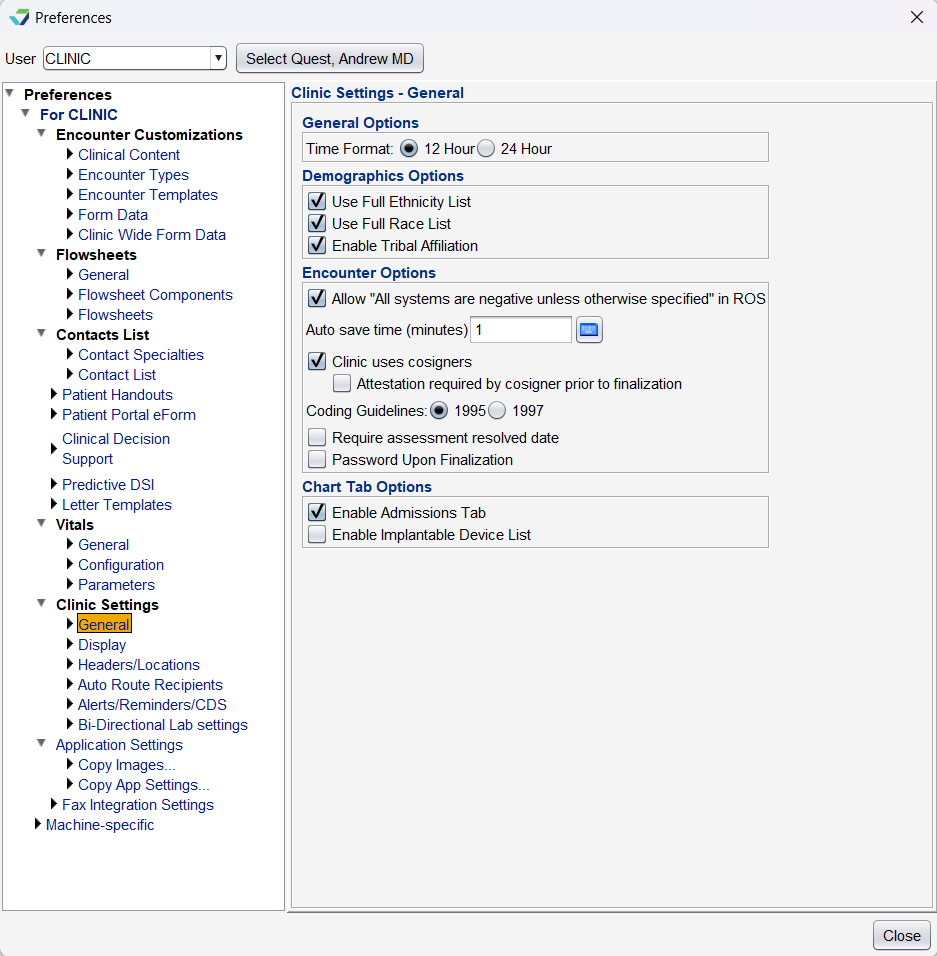
General Options
Time Format: sets all time entry fields and time displays to 12 Hour or 24 Hour format
Demographics Options
The following options are used to customize the Patient Information subtab in chart Demographics:
Preferred Language List: expands the Preferred Language selection list in the Patient tab. The Short list displays 184 languages, the Medium list displays 486 languages, and the Long list displays 8115 languages
Use Full Ethnicity List: expands the Ethnicity selection list in the Patient tab
Use Full Race List: expands the Race selection list in the Patient tab
Enable Tribal Affiliation: enables the Tribal Affiliation fields in the Additional Info tab
Encounter Options
Allow “All systems are negative unless otherwise specified” in ROS: adds a checkbox to the Review of Systems tab to allow attestation of all systems reviewed as negative unless otherwise documented
Auto save time (minutes): automatically saves an encounter at the time interval specified
Clinic uses cosigners: enables the Co-sign option at encounter finalization and the Amend and Cosign option for Past Encounters for users with Cosigner designation
Attestation required by cosigner prior to finalization: requires users with Cosigner designation to complete an attestation statement when finalizing encounters. Contact Sevocity Support to set up customized attestation statements if selecting this option
Coding Guidelines: displays the E/M coding guidelines being used for the clinic
Require assessment resolved date: requires the user to input a date when resolving a patient problem in the Assessment tab
Password Upon Finalization: requires a user password when finalizing an encounter
Chart Tab Options
Enable Admissions Tab: displays the Admissions tab in the chart
Enable Implantable Device List: displays the Implantable Devices tab in the chart for users with an Access Level of Restricted Chart Entry or Full Chart