
Measure: Percentage of patients 18-75 years of age with diabetes and an active diagnosis of retinopathy in any part of the measurement period who had a retinal or dilated eye exam by an eye care professional during the measurement period or diabetics with no diagnosis of retinopathy in any part of the measurement period who had a retinal or dilated eye exam by an eye care professional during the measurement period or in the 12 months prior to the measurement period | ||
| Measure Type | High Priority Measure | Scoring |
| Process | No | A higher percentage indicates better quality |
| Denominator | Patients 18-75 years of age by the end of the measurement period, with diabetes with a visit during the measurement period |
| Numerator | Patients with an eye screening for diabetic retinal disease. This includes diabetics who had one of the following:
|
| Denominator Exceptions | None |
| Denominator Exclusions |
|
Denominator
Patients who meet the following criteria will be included in the denominator:
Age is 18 years to 75 years at the end of the Measurement Period
AND
Have an active diagnosis of Type 1 or Type 2 diabetes during the Measurement Period
AND
- Have at least one eligible encounter during the Measurement Period finalized by the EC
Encounter Codes Eligible for Denominator
CPT: 99202, 99203, 99204, 99205, 99212, 99213, 99214, 99215, 99395, 99396, 99397, 99385, 99386, 99387, 99341, 99342, 99344, 99345, 99347, 99348, 99349, 99350, 92002, 92004, 92012, 92014, 98966, 98967, 98968, 99441, 99442, 99443
HCPCS: G0402, G0438, G0439
Diagnosis
Diagnoses are documented in the Assessment tab of an encounter. A comprehensive list of eligible diagnosis codes for diabetes can be located here.
Denominator Exclusions
A patient will be excluded from the measure if they meet any of the following conditions:
- Is in hospice care for any part of the Measurement Period
- Is receiving palliative care for any part of the Measurement Period
- Age is ≥ 66 at the end of the Measurement Period and are living long term in a nursing home any time on or before the end of the Measurement Period
- Age is ≥ 66 at the end of the Measurement Period and has evidence of frailty and advanced illness
Hospice Care Services
To document hospice care ambulatory services, go to Encounter > Orders/Procedure > Orders/Referrals and click Add to add one of the eligible codes listed below:
CPT: 99377, 99378
HCPCS: G0182
Order Status must be marked as Pending or Complete.
To document hospice care encounter services, go to Encounter > Orders/Procedure > Orders/Referrals and click Add to add one of the eligible codes listed below:
HCPCS: G9473, G9474, G9475, G9476, G9477, G9478, G9479, Q5003, Q5004, Q5005, Q5006, Q5007, Q5008, Q5010, S9126, T2042, T2043, T2044, T2045, T2046
Order Status must be marked as Complete.
Palliative Care
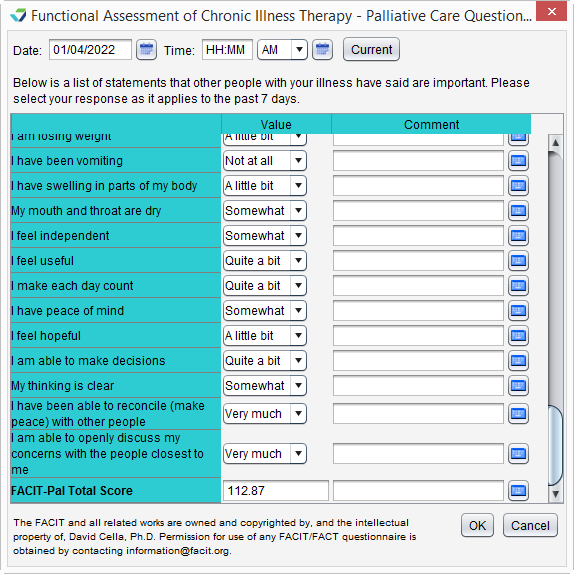
Palliative care services can be documented using the FACIT-Pal Questionnaire flowsheet, as an order, or as a diagnosis.
FACIT-Pal Questionnaire Flowsheet
Go to Encounter > Flowsheets/Labs > Standard or Chart > Flowsheets/Labs > Standard
Click Add New Flowsheet
Select the FACIT-Pal Questionnaire flowsheet and click Add
Click Add Column
Populate the patient’s responses to the questions as appropriate
Click OK to save
Palliative Care Services Order
Go to Encounter > Orders/Procedure > Orders/Referrals and click Add to add one of the eligible codes listed below:
HCPCS: G9054
Order Status must be marked as Complete.
Palliative Care Diagnosis
Diagnoses are documented in the Assessment tab of an encounter. The eligible diagnosis code for palliative care is:
ICD-10: Z51.5
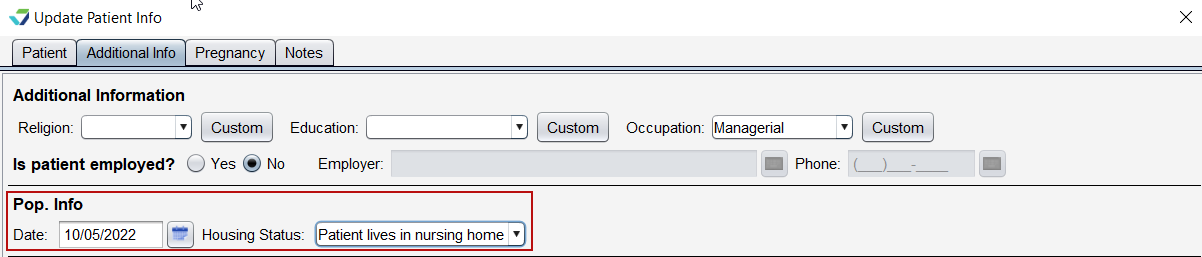
Living Long Term in a Nursing Home
To document a nursing home stay:
Go to Chart > Demographics > Patient Info
Click Update
Click Additional Info tab
Populate the Date field in the Pop. Info section
Select Patient lives in nursing home for Housing Status
Click Save
Frailty and Advanced Illness
Frailty
A patient has evidence of frailty if they meet any of the following criteria:
- Has an active diagnosis of Frailty during the Measurement Period
- Has an active diagnosis of Frailty Symptom during the Measurement Period
- Is using a frailty device during the Measurement Period
- Has a frailty encounter during the Measurement Period
Frailty Diagnosis
“Frailty” refers to a range of conditions that includes falls and problems affecting mobility.
Diagnoses are documented in the Assessment tab of an encounter. A comprehensive list of eligible diagnosis codes for frailty can be located here.
Frailty Symptom Diagnosis
Diagnoses are documented in the Assessment tab of an encounter. The eligible diagnosis codes for frailty symptoms are:
ICD-10: R26.2, R26.89, R26.9, R53.1, R53.81, R54, R62.7, R63.4, R63.6, R64
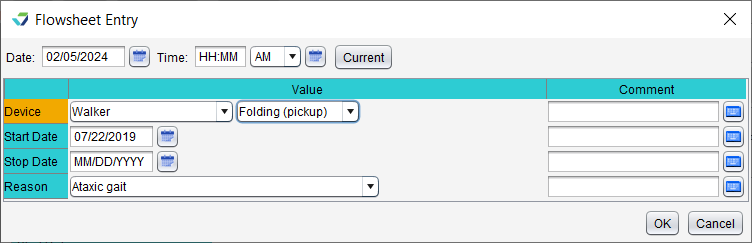
Frailty Device Use
To document the patient’s use of a frailty device:
- Go to Encounter > Flowsheets/Labs > Standard or Chart > Flowsheets/Labs > Standard
- Click Add New Flowsheet
- Select the Frailty Device flowsheet and click Add
- Click Add Column
- Select a Device and the type (Value) of device
- Populate a usage Start Date for the device
- Optional: populate a usage Stop Date for the device
- The Stop Date cannot occur prior to the start of the Measurement Period
- Optional: populate a Reason for use of the device
- Click OK to save
Frailty Encounter Codes Eligible for Denominator Exclusion
CPT: 99504, 99509
HCPCS: G0162, G0299, G0300, G0493, G0494, S0271, S0311, S9123, S9124, T1000, T1001, T1002, T1003, T1004, T1005, T1019, T1020, T1021, T1022, T1030, T1031
Advanced Illness
A patient has evidence of advanced illness if they meet any of the following criteria:
- Had an active diagnosis of Advanced Illness during the Measurement Period or in the year prior
- Was prescribed medication for dementia during the Measurement Period or in the year prior
Advanced Illness Diagnosis
“Advanced illness” refers to a wide range of conditions and includes diseases such as Alzheimer’s disease, cancer, and heart failure.
Diagnoses are documented in the Assessment tab of an encounter. A comprehensive list of eligible diagnosis codes for advanced illness can be located here.
Medication
To prescribe a medication, go to Encounter > Medications > Manage/Prescribe Meds > New Prescription or Chart > Medications/Assessments > Modify. A comprehensive list of eligible dementia medications can be located here.
Numerator
A patient will be counted in the numerator if they received a retinal eye exam or a dilated eye exam.
- Patients with an active diagnosis of diabetic retinopathy during the Measurement Period must receive their exam during the Measurement Period
- Patients who do not have an active diagnosis of diabetic retinopathy during the Measurement Period must receive their exam during the Measurement Period or in the 12 months prior to the start of the Measurement Period
The eye exam must be performed by an ophthalmologist or optometrist.
Diagnosis
Diagnoses are documented in the Assessment tab of an encounter. A comprehensive list of eligible diagnosis codes for diabetic retinopathy can be located here.
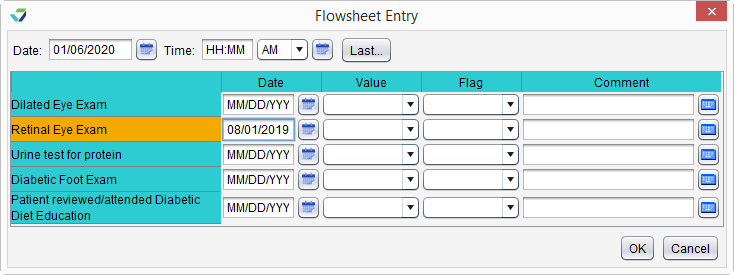
Document a Dilated or Retinal Eye Exam in the Diabetes Care Flowsheet
- Go to Encounter > Flowsheets/Labs > Standard or Chart > Flowsheets/Labs > Standard
- Click Add New Flowsheet
- Select the Diabetes Care flowsheet and click Add
- Click Add Column
- Populate a Date and Value for the Dilated Eye Exam or Retinal Eye Exam
- Click OK to save
eCQI Reference
Return to 2025 eCQMs