
| Measure: Percentage of patients with referrals, regardless of age, for which the referring clinician receives a report from the clinician to whom the patient was referred | ||
| Measure Type | High Priority Measure | Scoring |
| Process | Yes | A higher percentage indicates better quality |
| Denominator | Number of patients, regardless of age, who had an encounter during the measurement period and were referred by one clinician to another clinician on or before October 31 |
| Numerator | Number of patients with a referral on or before October 31, for which the referring clinician received a report from the clinician to whom the patient was referred |
| Denominator Exceptions | None |
| Denominator Exclusions | Not Applicable |
Denominator
Patients who meet the following criteria will be included in the denominator:
Have at least one eligible encounter during the Measurement Period finalized by EC
AND
- Have at least one referral created on or before October 31 during the Measurement Period
Encounter Codes Eligible for Denominator
CPT: 92002, 92004, 92012, 92014, 99201, 99202, 99203, 99204, 99205, 99212, 99213, 99214, 99215, 99395, 99396, 99397, 99381, 99382, 99383, 99384, 99385, 99386, 99387, 99391, 99392, 99393, 99394
Patient Referral
To document a referral from the patient chart or patient encounter:
- From the Referrals tab in the chart or the Orders/Referrals tab in the encounter, click Add
- Populate the following sections:
- Date Requested (chart level only)
- Requested By
- Requested By must be EC
- Refer To
- Refer To must be another provider
- Reason for Referral/Notes
- ICD Code or CPT/HCPCS
- Click Add
Numerator
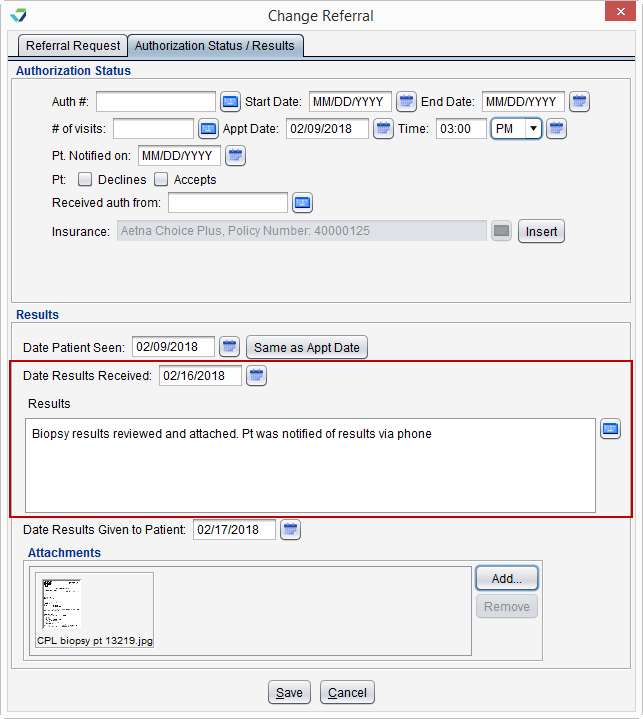
A patient will be counted in the numerator when the referral results are documented in the referral.
- Referral results must be documented at the chart level
- Documentation of results must occur after the referral has been created
- If a patient has multiple referrals during the Measurement Period, the first referral will be counted toward the numerator
Documenting Referral Results
To document referral results:
- From the Referrals tab, select the referral and click Update
- From the Authorization Status/Results tab, populate Date Results Received and type information in the Results field
- Date Patient Seen, Date Results Given to Patient, and Attachments can be populated but are optional
- Click Save
eCQI Reference
Return to 2024 eCQMs