
| Measure: Percentage of patients 65 years of age and older who were screened for future fall risk during the measurement period | ||
| Measure Type | High Priority Measure | Scoring |
| Process | Yes | A higher percentage indicates better quality |
| Denominator | Patients aged 65 years and older with a visit during the measurement period |
| Numerator | Patients who were screened for future fall risk at least once within the measurement period |
| Denominator Exceptions | None |
| Denominator Exclusions | Patients whose hospice care overlaps the measurement period |
Denominator
Patients who meet the following criteria will be included in the denominator:
Age is ≥ 65 years at the beginning of the Measurement Period
AND
- Have at least one eligible encounter during the Measurement Period finalized by the EC/EP
Encounter Codes Eligible for Denominator
CPT: 99201, 99202, 99203, 99204, 99205, 99212, 99213, 99214, 99215, 99395, 99396, 99397, 99385, 99386, 99387, 99341, 99342, 99343, 99344, 99345, 99347, 99348, 99349, 99350, 92002, 92004, 92012, 92014, 99401, 99402, 99403, 99404, 99315, 99316, 99318, 99304, 99305, 99306, 99307, 99308, 99309, 99310, 99324, 99325, 99326, 99327, 99328, 99334, 99335, 99336, 99337, 92540, 92541, 92542, 92548
HCPCS: G0438, G0439
Denominator Exclusions
Patients who were in hospice care during the Measurement Period will be excluded from the measure.
To document hospice care services as a procedure, go to Encounter > Orders/Procedure > Orders/Referrals and click Add to add one of the eligible codes listed below:
SNOMED CT: 385763009, 385765002
Order Status must be marked as Pending or Complete.
Note
SNOMED CT codes must be added as a Favorite in Preferences > Form Data > Orders to be accessible from the Orders/Referrals tab.
Numerator
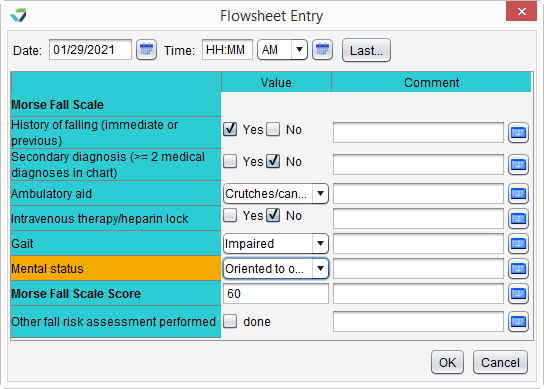
A patient will be counted in the numerator if they received a fall risk screening using the Morse Fall Scale assessment tool or through another screening method during the Measurement Period.
Morse Fall Scale
To document a screening using the Morse Fall Scale:
- Go to Encounter > Flowsheets/Labs > Standard Flowsheets
- Click Add New Flowsheet
- Select the Fall Risk Screening flowsheet and click Add
- Click Add Column
- Select a Value for all questions in the screening
- Click OK to save
Other Screening Methods
To document the performance of a fall risk screening with a different screening tool:
- Go to Encounter > Flowsheets/Labs > Standard Flowsheets
- Click Add New Flowsheet
- Select the Fall Risk Screening flowsheet and click Add
- Click Add Column
- Select the Done checkbox for Other fall risk assessment performed
- Click OK to save
Sevocity Best Practice
If Other fall risk assessment performed is selected, the name of the screening tool should be documented in the encounter in which it was performed
eCQI Reference
Return to 2021 eCQMs