
Objective: Implement clinical decision support (CDS) interventions focused on improving performance on high-priority health conditions
| An EP must satisfy both measures for this objective through a combination of meeting the thresholds and exclusions. | |
| Measure 1: Implement five CDS interventions related to four or more clinical quality measures (CQMs) at a relevant point in patient care for the entire EHR reporting period. Absent four CQMs related to an EP’s scope of practice or patient population, the CDS interventions must be related to high-priority health conditions. | |
| Measure 2: Enable and implement the functionality for drug-drug and drug-allergy interaction checks for the entire EHR reporting period. | |
| Exclusion | Measure 2: An EP who writes fewer than 100 medication orders during the EHR reporting period may take an exclusion |
| Reporting | EPs must attest YES to implementing five clinical decision support interventions related to four or more CQMs at a relevant point in patient care for the entire EHR reporting period and YES to enabling and implementing the functionality for drug-drug and drug-allergy interaction checks for the entire EHR reporting period. |
Measure 1
Health Guidelines and encounter alerts can be used as a clinical decision support tools within Sevocity. The ability to create and maintain Health Guidelines and set alerts is available for Clinic Administrators only.
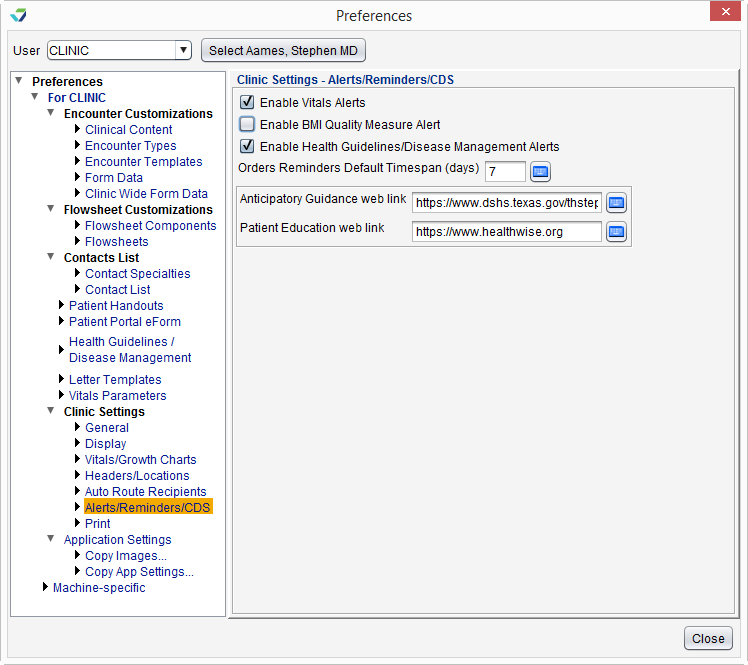
 To enable encounter alerts, go to Tools > Preferences > CLINIC > Alerts/Reminders/CDS. Alerts for Vitals, BMI Quality Measure, and Health Guidelines/Disease Management can be enabled in this area.
To create or edit Health Guidelines, go to Tools > Preferences > CLINIC > Health Guidelines/Disease Management > Begin Edit
To set preferences for vital sign parameters, go to Tools > Preferences > CLINIC > Vitals Parameters
Note
Users with permission to enable clinical decision support interventions can change, override, or customize a Health Guideline for a patient through the patient chart. Security Administrators can enable or disable access for individual users by going to Tools > Security Administration > Edit User and selecting or clearing the Can Enable CDS Interventions checkbox.
Tip
Health Guidelines for a specific patient can be viewed at the chart level from the Health Guidelines Management tab. A list of all patients who have not met a recommended Health Guideline can be generated using the Health Maintenance Disease Management Reminder List Report report.
Measure 2
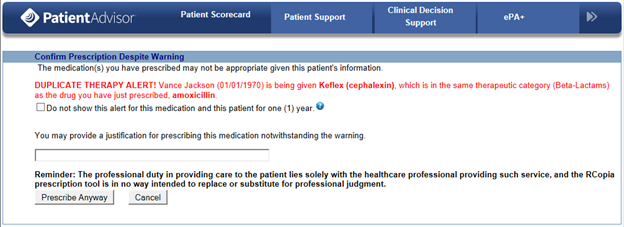
Drug-drug and drug-allergy interaction checks are enabled in Rcopia and will display warnings when medications or allergies are updated or when a medication is prescribed.
Additional Information
- For Measure 1, drug-drug and drug-allergy interaction alerts cannot be counted as clinical decision support interventions.
Return to 2019 Medicaid Promoting Interoperability Objectives