
In This Release…
Categories for Bi-directional Lab Favorites
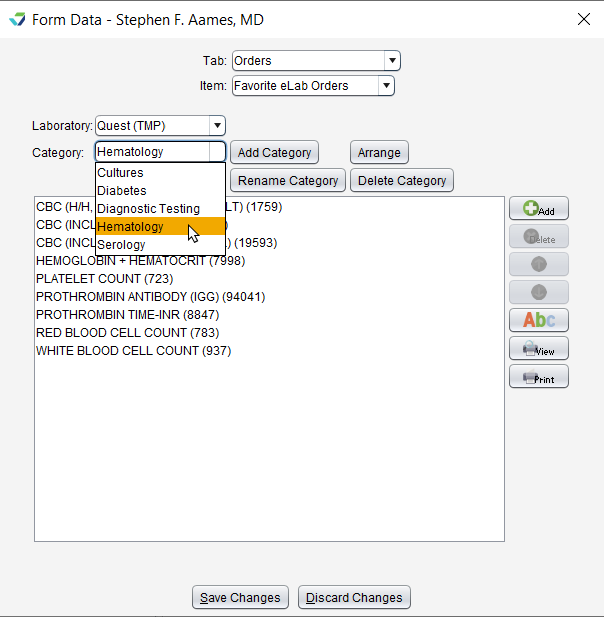
The option to organize favorite eLabs within a Category has been added for clinics with a bi-directional lab interface.
To add and organize Categories, go to Tools > Preferences > CLINIC or [user] > Form Data > Begin Edit and select Orders from the Tab list and Favorite eLab Orders from the Item list.
Health Guidelines Enhancements
The Health Guidelines tool has been redesigned to further support population health goals and improve patient health outcomes. New features provide the ability to:
Define patient populations using Implantable Devices, Procedures, and Vitals
Use diagnoses to include and exclude patients from a guideline
View a list of changes made by users to the guideline criteria
Add detailed source information
Additionally, the new Clinical Decision Support Intervention (CDSI) Report displays user actions in the Health Guidelines/Disease Management chart tab and for Health Guidelines alerts in the encounter.
Predictive DSI for Patient Population Health
Sevocity now has the ability to integrate with Predictive Decision Support Intervention (DSI) tools. Predictive DSIs are healthcare tools that produce recommendations or predictions for patient care based on technology such as algorithms and machine learning.
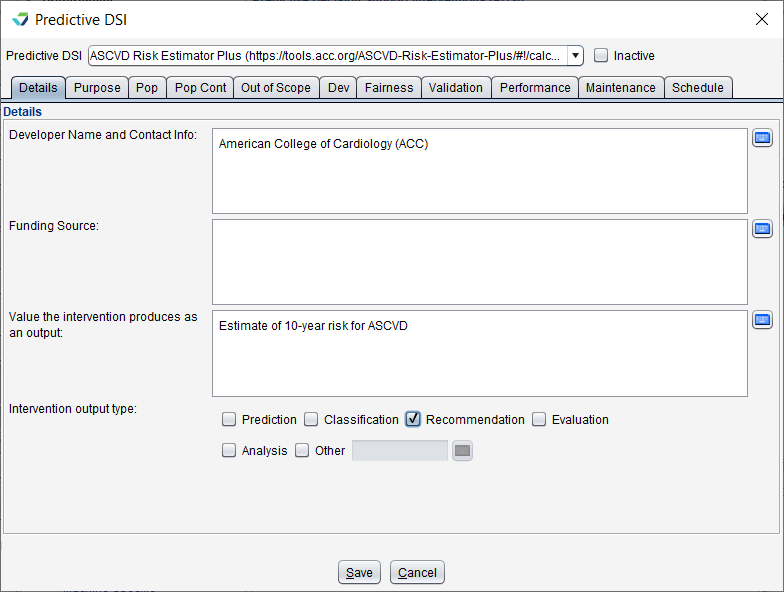
Customers interested in this feature should contact Sevocity Support to begin the process of a new PDSI integration. Integration requirements and fees vary per request.
Questions about our new features?